> ## Documentation Index
> Fetch the complete documentation index at: https://julius.ai/docs/llms.txt
> Use this file to discover all available pages before exploring further.
# Troubleshooting
> Resolve common issues in Julius, from file uploads to login problems, system errors, and account access. This page covers the most reported technical issues users face and provides practical solutions to get back on track quickly.
## Common Issues and Troubleshooting Steps:
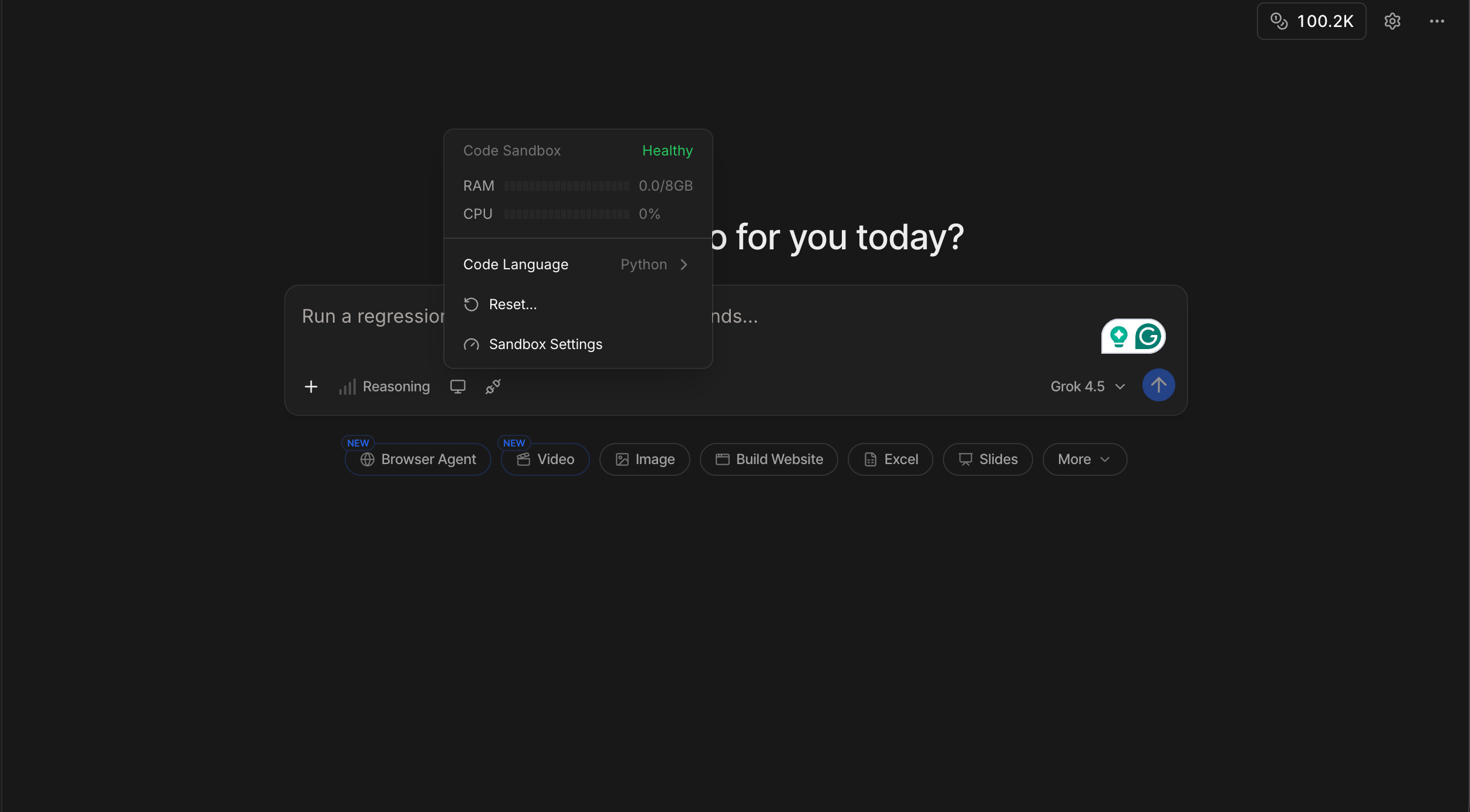
Click the **Code Sandbox** icon in the chat bar, then click **Reset...**, then click **Restart container**. This safely restarts the code environment and preserves your files and settings.
If you need more RAM, click on **Code Sandbox** icon → **Sandbox Settings** and switch to **Memory Boost** (available on the Pro plan and higher). See [Containers](/docs/get-started/containers) for details.
If restarting doesn't fix it, expand **I'm still having issues** in the same dialog to reveal **Factory Reset**.
Factory Reset will completely reset your account and permanently delete all uploaded files and memory.
 AI will sometimes do something called 'hallucinating' when it starts to go into loops and can't produce an output.
Try to reword the prompt to be more specific and have more detail to help guide Julius.
If there have been multiple crashes, it's best to start a new thread from scratch so the AI can refresh and restart to provide a better output.
The code can sometimes get sent to your spam email.
If it's not in your spam, send us and email at [team@julius.ai](mailto:team@julius.ai).
If you're unable to click and download files/visualizations from Julius directly, try the following troubleshooting steps:
* look for the file in your available files
AI will sometimes do something called 'hallucinating' when it starts to go into loops and can't produce an output.
Try to reword the prompt to be more specific and have more detail to help guide Julius.
If there have been multiple crashes, it's best to start a new thread from scratch so the AI can refresh and restart to provide a better output.
The code can sometimes get sent to your spam email.
If it's not in your spam, send us and email at [team@julius.ai](mailto:team@julius.ai).
If you're unable to click and download files/visualizations from Julius directly, try the following troubleshooting steps:
* look for the file in your available files
 * try refreshing the browser
* ask Julius to reproduce the document for you
These troubleshooting topics are based on over 340 user conversations. We’re continually expanding this section based on your feedback. If you're experiencing an issue not covered here, email us at [team@julius.ai](mailto:team@julius.ai).
* try refreshing the browser
* ask Julius to reproduce the document for you
These troubleshooting topics are based on over 340 user conversations. We’re continually expanding this section based on your feedback. If you're experiencing an issue not covered here, email us at [team@julius.ai](mailto:team@julius.ai).