> ## Documentation Index
> Fetch the complete documentation index at: https://julius.ai/docs/llms.txt
> Use this file to discover all available pages before exploring further.
# Chat Interface
> The chat interface is the heart of the Julius AI experience. Designed to be intuitive and powerful, the chat brings natural language and structured thinking together in a single, fluid space.
***
 ***
## Main Chat Bar:
***
## Main Chat Bar:
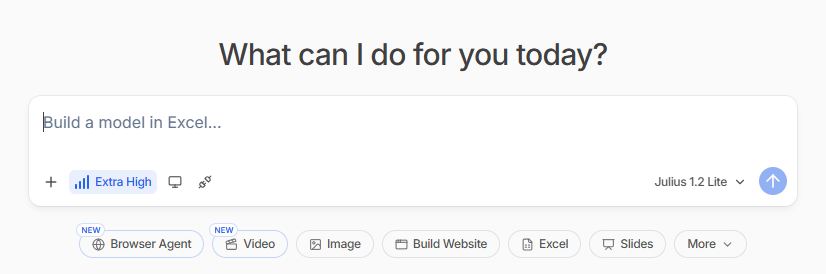 Click to add files from your computer or import from **Google Drive**, **OneDrive**, **SharePoint**, or **Google Sheets**.
Supported formats: CSV, XLSX (multi-sheet), PDF, JSON, Parquet, Images (JPEG/PNG).
Controls how deeply Julius thinks before responding. Set via the bars icon next to the intensity level.
* **Low / Medium** - Fast responses, best for simple questions.
* **High / Extra High** - Extended thinking. The model thinks longer, writes more complex code, and double-checks results. Use for messy data cleaning, complex analysis, modeling, or when accuracy matters more than speed.
Click the screen/window icon to view and manage your code execution environment. The Code Sandbox is where Julius runs all code behind your analysis.
* **Code Sandbox status** - Shows whether your sandbox is **Healthy** or needs attention.
* **RAM & CPU** - Live usage of your container resources (e.g. 0.0/8GB RAM, 0% CPU).
* **Code Language** - The runtime Julius is currently using (e.g. Python). Click to switch between Python, R, and other supported runtimes.
* **Reset** - Restart the sandbox if it is slow or behaving unexpectedly. This clears the execution state but keeps your files.
* **Sandbox Settings** - Additional configuration for your code environment.
Click the link/nodes icon to open the Connectors panel, where you can connect external data sources and tools to Julius.
**Integrations**
* **Slack** - Connect your Slack workspace to receive reports and insights.
**Data Warehouses**
* **BigQuery** - Connect your BigQuery data for instant AI analysis.
* **Snowflake** - Connect your Snowflake data for instant AI analysis.
**Databases**
* **Postgres** - Connect your Postgres data for instant AI analysis.
* **MySQL** - Connect your MySQL data for instant AI analysis.
* **SqlServer** - Connect your SqlServer data for instant AI analysis.
* **Supabase** - Connect your Supabase data for instant AI analysis.
**File and Cloud Integrations**
* **Google Drive** - Analyze your Google Drive files and folders.
* **Google Sheets** - Live connection to your Google Sheets.
* **Microsoft OneDrive** - Analyze your Personal OneDrive files and folders.
* **SharePoint** - Analyze your SharePoint or OneDrive for Business files.
* **Google Ads** - Analyze your data and manage your campaigns in Google Ads.
* **Meta Ads** - Analyze your data and manage your campaigns in Meta Ads.
Do not see your data source? Click **Request connector** to let the Julius team know.
Click the model name (e.g. **Julius 1.2 Lite**) to switch between available models.
**Julius models**
* **Julius 1.2 Ultra** - For only the most complex tasks.
* **Julius 1.2 Max** - Most capable agent for complex analysis.
* **Julius 1.2** - Best for most questions.
* **Julius 1.2 Lite** *(default)* - Fast agent for quick questions.
**General models**
* **Claude Sonnet 5** - Anthropic latest Sonnet model.
* **Claude Fable 5** - Anthropic storytelling-optimized model.
* **Claude Opus 4.8** - Anthropic most capable model.
* **Muse Spark 1.1** - Creative and generative tasks.
* **GPT-5.6 Sol** - OpenAI latest model.
* **Grok 4.5** - xAI conversational model.
Let Julius control a real browser. It can go to a website, log in, click buttons, fill forms, scrape JS-heavy pages, or book/apply/order something. Use when you need to do something on the web, not just search it.
Text-to-video, image-to-video, or video editing. Generates MP4s using Sora/Veo-style models. Give it an image and a prompt, or ask it to edit an existing video.
Generate or edit images. Create charts, infographics, logos, edit an uploaded image, remove backgrounds, and more.
Generates a full interactive website, dashboard, or web app as an HTML artifact you can preview and publish. Great for dashboards, portfolios, and data apps.
Build advanced Excel workbooks with formulas, multi-sheet models, pivot tables, VBA, and XlsxWriter with a properly formatted, downloadable `.xlsx` file.
Builds a polished 16:9 HTML slide deck you can export to PPTX. Creates animated, styled presentations with charts, not just bullet points.
Additional output formats Julius can build for you:
* **Stock Analysis** - Analyze stocks, pull financial data, and generate investment insights.
* **Dashboard** - Build an interactive multi-panel dashboard to explore and present your data.
* **Report** - Generate a structured, formatted report summarizing your analysis.
Get started with your analysis and see all these features in action!
Click to add files from your computer or import from **Google Drive**, **OneDrive**, **SharePoint**, or **Google Sheets**.
Supported formats: CSV, XLSX (multi-sheet), PDF, JSON, Parquet, Images (JPEG/PNG).
Controls how deeply Julius thinks before responding. Set via the bars icon next to the intensity level.
* **Low / Medium** - Fast responses, best for simple questions.
* **High / Extra High** - Extended thinking. The model thinks longer, writes more complex code, and double-checks results. Use for messy data cleaning, complex analysis, modeling, or when accuracy matters more than speed.
Click the screen/window icon to view and manage your code execution environment. The Code Sandbox is where Julius runs all code behind your analysis.
* **Code Sandbox status** - Shows whether your sandbox is **Healthy** or needs attention.
* **RAM & CPU** - Live usage of your container resources (e.g. 0.0/8GB RAM, 0% CPU).
* **Code Language** - The runtime Julius is currently using (e.g. Python). Click to switch between Python, R, and other supported runtimes.
* **Reset** - Restart the sandbox if it is slow or behaving unexpectedly. This clears the execution state but keeps your files.
* **Sandbox Settings** - Additional configuration for your code environment.
Click the link/nodes icon to open the Connectors panel, where you can connect external data sources and tools to Julius.
**Integrations**
* **Slack** - Connect your Slack workspace to receive reports and insights.
**Data Warehouses**
* **BigQuery** - Connect your BigQuery data for instant AI analysis.
* **Snowflake** - Connect your Snowflake data for instant AI analysis.
**Databases**
* **Postgres** - Connect your Postgres data for instant AI analysis.
* **MySQL** - Connect your MySQL data for instant AI analysis.
* **SqlServer** - Connect your SqlServer data for instant AI analysis.
* **Supabase** - Connect your Supabase data for instant AI analysis.
**File and Cloud Integrations**
* **Google Drive** - Analyze your Google Drive files and folders.
* **Google Sheets** - Live connection to your Google Sheets.
* **Microsoft OneDrive** - Analyze your Personal OneDrive files and folders.
* **SharePoint** - Analyze your SharePoint or OneDrive for Business files.
* **Google Ads** - Analyze your data and manage your campaigns in Google Ads.
* **Meta Ads** - Analyze your data and manage your campaigns in Meta Ads.
Do not see your data source? Click **Request connector** to let the Julius team know.
Click the model name (e.g. **Julius 1.2 Lite**) to switch between available models.
**Julius models**
* **Julius 1.2 Ultra** - For only the most complex tasks.
* **Julius 1.2 Max** - Most capable agent for complex analysis.
* **Julius 1.2** - Best for most questions.
* **Julius 1.2 Lite** *(default)* - Fast agent for quick questions.
**General models**
* **Claude Sonnet 5** - Anthropic latest Sonnet model.
* **Claude Fable 5** - Anthropic storytelling-optimized model.
* **Claude Opus 4.8** - Anthropic most capable model.
* **Muse Spark 1.1** - Creative and generative tasks.
* **GPT-5.6 Sol** - OpenAI latest model.
* **Grok 4.5** - xAI conversational model.
Let Julius control a real browser. It can go to a website, log in, click buttons, fill forms, scrape JS-heavy pages, or book/apply/order something. Use when you need to do something on the web, not just search it.
Text-to-video, image-to-video, or video editing. Generates MP4s using Sora/Veo-style models. Give it an image and a prompt, or ask it to edit an existing video.
Generate or edit images. Create charts, infographics, logos, edit an uploaded image, remove backgrounds, and more.
Generates a full interactive website, dashboard, or web app as an HTML artifact you can preview and publish. Great for dashboards, portfolios, and data apps.
Build advanced Excel workbooks with formulas, multi-sheet models, pivot tables, VBA, and XlsxWriter with a properly formatted, downloadable `.xlsx` file.
Builds a polished 16:9 HTML slide deck you can export to PPTX. Creates animated, styled presentations with charts, not just bullet points.
Additional output formats Julius can build for you:
* **Stock Analysis** - Analyze stocks, pull financial data, and generate investment insights.
* **Dashboard** - Build an interactive multi-panel dashboard to explore and present your data.
* **Report** - Generate a structured, formatted report summarizing your analysis.
Get started with your analysis and see all these features in action!